Showing posts with label TIPS AND TRICKS. Show all posts

Reliance offers Free Gprs Access Twitter for 90 days


Good news for all Reliance users . Reliance  India has partnered with Twitter Team to offer free Twitter for this IPL Season,This offer is available for all RIM subscribers for this IPL season without any charges. After 90 days of service (3 months)  a small fee will be charged to continue this service further. The twitter Team as a part of this promotion program  has customized its application mentioning on header and footer with a message 
” Twitter is free of charge with Reliance Mobile”

To subscribe to this service, users need to send a message  ACT Twitter to number 53739 from their prepaid GSM Reliance Number.


Another alternative is you can easily dial *777*30# from their mobile phones, or head over to http://m.twitter.com from the phone’s browser.

So go ahead and enjoy RIM users. More tricks for other operators will be updated shortly.

Watch Live Streaming India Vs Australia Test Match Mobile & PC Links


Watch Live India Vs Australia Test cricket Match online on PC & Mobile.Mobile users Need to just paste the links in the browser which will take you to the steaming media player .Make sure you have done proper operator settings before you stream.All hence forth matches played will be available on the the same URL.
For PC users you can use VLC media player you can download it from here. If you help on how to stream then please refer this


So Here are the links:


Latest Ebuddy Handler For Android .apk Download


only @Gprs9


Here is a latest handler for Ebuddy Android OS . The handler is more powerful than the previous version.
It has included lots of features along with facebook integration , The software is very useful for mobile users who wish to stay online using multiple accounts and being at multiple places. The handler is free from virus or any other theft I have checked the version personally .
You can sign in using multiple accounts and can link your facebook profile to get latest post and comments by your friends.This lets you use only one software instead of using several browser and mesangers which eats up your phone memory and hangs and halts.
You can easily download the copy for you from the link below 
use any of the working IP and Port in the handler menu
If you have a working Front query or Backquery you can use the same to use it free on your network.
I will try to update the settings for Airtel , Vodafone and Idea just in the following post. 

Link1:
Link2:


Watch Live India vs Pakistan Match on Mobile TV Links


Watch Exclusive Live Coverage of India v/s Pakistan Series on mobile. You don't have to pay any access fees for the connection ,only a Gprs pack is enough (Make sure you have enough data or Unlimited pack subscription 1Gb+).These links are useful for the cricket geeks who are away from home and still wish to enjoy the live coverage of Match.These links will work on all the operator eg. Airtel,Vodafone,Bsnl,Tata Docomo ,Aircel etc and also broadband users can watch match using Vlc player.The links work both on 2G and 3G network.

FOR MOBILE USERS:

For mobile users Direct click the link and you will be taken to the streaming media player.

N.B: For Nokia S40 series you may have to do some settings or enable streaming 

Links:

FOR 2G Network(High Quality):

rtsp://23.21.104.244/advert/dd_national50.sdp

FOR 3G Newwork(HQ + HD):

rtsp://23.21.104.244/advert/dd_national150.sdp

For PC USERS:

#You need to have VLC media player installed on your system. If you have not installed yet get it from here http://www.filehippo.com/download_vlc_32/

#Now  open vlc media player and go to 

 media -> open network stream -> protocol -> RTSP 

#Paste this in address: 23.21.104.244/advert/dd_national150.sdp

and click on open .


#This will open  the stream as shown in above snapshot.


NB:If any firewall prompt messages appear then click on allow/unblock.


How to Download and Install Windows 8 in Easy Steps ?

Windows 8

Windows 8 is latest and new release on windows platform. As seen on Global Stat there is no doubt that over 76% of people worldwide use windows Operating system (Windows 7,XP,Vista,8).Here I am going to drive you through quick guide how to download and install Windows 8 from the official website.
Firstly You have to Download the 2.5GB(approx) ISO Image from the Microsoft's webstore or if you got it on a disc well good!! or already have a soft copy then burn in Bootable CD. The process takes about 15 minutes at the most ,if you have fast internet connection then you are probably to finish it early. I assume that you have downloaded the copy from the website and we are ready to begin.I have put on many Images so that it becomes easy for you to do the installation easily.


STEP1: Insert the Bootable CD in your disc Drive.You see something like this:

SPLASH SCREEN
CHOOSE AND HIT NEXT

HIT NEXT


STEP2: Hope you are done with the previous step properly ,Now we move on to the installation process. Here you need to enter The product key, That is obvious Or you have option 2 that is use any Activator (leave blank product Keybox).Input Key to enjoy full features of windows 8 so instead of paying ~Rs.9000 for  license, all you can do is to grab the product key from the download page itself, see screenshot below.


STEP3: Done with Step2 Now you will have to agree to the Windows license T&C, and select any one options :

1)upgrade
2)custom installation. 


The latter lets you choose which hard drive to use as common in most windows OS installation . Later steps are most easy if you happen to installed Windows before, this screen will be quite familiar. This takes longer time about 8-10 minutes at the most.


STEP4: After completing the installation, The on the screen you will see another  fish, Now you can start Personalizing your computer, like giving your computer a name or choose the color style's and so on..After this you need to do the installation settings.


STEP5: There are 2 modes as seen earlier .Now,If you select " custom installation ",then you will get options for doing sharing and connecting to devices releted and other common settings , Do not skip these settings as they are important part to keep your computer safe and up-to-date running.


STEP6: Now you can sign to your new Windows OS and download applications from the new Windows Store and synchronize data across different computers . You will be asked to enter a mobile phone number(optional), alternate-mail address, and security question, so Microsoft can help you reset your password incase you cant login intop your account.After signing in, you'll finally be looking at Microsoft's Glamorous  new Metro-interface for Windows 8.


Well talking about Metro Interface there lots of things you can do using Metro interface, common such as accessing the Windows Store, and various applications such as Email, SkyDrive, Live Photos, Use Internet Explorer , XBOX Live Games which is pretty great and lots more.Often people find difficult to adapt to new interface so there is option for you as most of you many want ,if you find Microsoft's new tile based setup overwhelming or difficult to use, you can switch back to the traditional desktop interface any time. 
Hope this gave you some Idea about windows 8 installation and lots information on the new OS and its features , If at all you have any queries , Questions you can comment below or Refer Microsoft website which is best and up-to-date place. This post is written in line to the newly release however times may change and over years the installation procedures may differ so it is best to refer the official website.

New Latest Opera Mini 7 Android Handler Download


I Had earlier posted Opera mini Android handler which is now outdated with new Android OS release , so Here I am posting bunch of fresh Opera mini handlers which you can use to Avail free Gprs on your Android handset by just using operator trick.I Received many Request from users for an handler application so here is Opera 7 handler . You only have to Download this for free Full version. 


For those of you having problem in installation can refer a small screenshot posted below.

HOW TO USE ? 

1. Download Handler application from the given link.

2. Edit The settings of the browser (Handler app) through 

            Option -> Edit -> settings.            

3. Then Finally put the Proxy, Homepage And APN. Hit save.


Features in Opera Mini 7 Next:

*Included endless number of Speed Bookmarks on your homepage.

*Included assistance for posting files & Downloading files.

*Included Zoom capability setting.

*Included Quit button to Operating system (check enable in settings)

*improvement and bug fix modifications.


(Some Features and Layout may vary depending upon which Handset you use)

DOWNLOADING LINKS :

OPERA MINI 7 (MEDIAFIRE)

OPERA MINI 7 (JUMBOFILES)

OPERA MINI LINK2 (JUMBOFILES)

How To Run Android Applications On PC?

Android is one of the famous and best Mobile Operating System in today's world .Before Android came up there were OS like  JAVA , J2ME Platform, then came Symbian Platform (Nokia Inc) and Now its Time for Android OS. Android apps are wonderful and awesome Compared to other OS apps.In this post Today , I am going to explain you how to Run android applications in PC.

Why Run android Apps on PC when you can Run them on your phone ? OK here is the answer , Imagine that you don't have a Android Phone and you got an amazing app which works on Android such as Games eg. Angry Birds.You want to test it out .But how can you test it out without having an Android Phone.Now This feature is only accessible through one software Named BLUESTACKS APP PLAYER.

Bluestacks app player is a software to run your Android .APK apps on PC.For running java apps on PC we use kemulator similar is this It comes with an inbuilt Android applications.It isn't an Android emulator actually but plays almost all android apk files except the Binaries.Bluestacks offers you to connect and synchronize between you Android phone .

Once you have finished downloading the file ,Now install it.When you run it, you can see that it launches in the FullScreen mode .
There are four option on startup.

RUNNING ALREADY INSTALLED APPS

Now suppose you want to run any app  you only have to choose the app from the 10 available apps option from there and run any of these Apps ,These are inbuilt apps .The Bluestacks App player using BLUESTACKS CLOUDCONNECT.

RUNNING ANY APP FROM YOUR COMPUTER

Now if you want to manually install an apk file to your APP player stored on the computer
First  go to the Program File of the application player, Check out whether HD-ApkHandler file is there.
Then go back to your apk file and choose the option OPEN WITH.
Open the apk file with the HD-ApkHandlker.
Then the file begins installing, once successfully installed, it will show the box displaying success message.

NOTE:You may get a message showing INSTALLATION FAILED., this is because the file you are trying to install is a binary file

You can easily download the software from here (official download)


                                              http://bluestacks.com/

Hope you Found What You Needed !!

Find More Tricks here

How to Run a Program as Administrator In Windows 8

In many cases we have to run the applications (on win 8 ) and programs with administrative Rights. If you were using Windows 7 or Windows Vista  operating system then you must have administrator rights for running programs when you just right clicked on the porgram .

In Windows 8  The situation is different when you right click on the programs then it will not display run as administrator option . But  Run as administrator option is available when you right click on a program shortcut on the desktop which is already installed, the same option doesn’t appear when you right click on program shortcut in the Start menu screen.
So Here are the important steps for running the programs with administrator rights in Windows 8 .

  • Now  to Run a Program as Administrator In Windows 8 ?
  • Now right click on the programs icon for seeing the advanced option .
  • Now you have to hit the advanced option then select Run as administrator option.
Done .

Thanks For Reading!!

Find More Tricks here

Manage Your Android smartphone Applications using Android Assistant

We all would like our device at the highest possible speed. Performing basic tasks on Android Smartphones and you feel like system is dragging and isn’t giving desired performance then possibly settings can be tweaked with use of a tool which lets you Close the unnecessary process and application which are running behind without your knowledge .
Android Assistant app will offers the ability to access 15 major functions easily and can set most of them and thus ensuring accelerate the performance of Android in  just few seconds.
MAIN INTERFACE

INTERFACE

Alternative Task manager is available for Android which is inbuilt and will not display all the processes which are running Behind


 FEATURES OF ANDROID ASSISTANCE:
 
  • Status Monitor: 
Displays real-time usage of CPU, memory and battery status, obtaining complete information on our device.
  • Process Manager:
A list of all applications are running and using memory. From here we can conclude that we are not using.
  • Cache cleaner:
 Manager to delete all unnecessary files freeing up more space.
  • Cleaning the system:
 In this case, delete your browser history, Market, Gmail, Google Earth and other elements typically that store information.
  • Battery saving settings: 
The usual options to enable or disable Bluetooth, WiFi, GPS, syncing, screen orientation, brightness and timeout screen.
  • Login Manager:
 Eliminates the automatic startup of some applications when the phone boots.
  • Uninstalling: 
A quick and easy way to uninstall the tools that we use.
  • Battery Usage:
Monitor running processes and use the battery to eliminate those who consume too much and not being used.
  • Startup Silent: 
Eliminate startup sounds on and off.
  • Ringer: 
Fast access to change the phone ring.
  • Start time:
 Information with the exact time of boot.
  • Widget: 
Activates the widget of the application for faster access.
  • Information System:
 Basic facts about hardware.
  • Volume Control: 
Controls the volume level of all sounds.

Usually one tends to have installed several applications that cover most of these tasks, but if you are one of those who want total control and want to know all the information in single app, you may Android Assistant to solve everything in one step.


(SIZE : 720 KB)
CLICK ON THE DOWNLOAD LINK ABOVE TO DOWNLOAD


Find More Tricks here

Live Tv Channel links for your mobile and Pc all operators

Here are live tv channels links for mobile you can also watch these channels on Computer using VLC media
media player . This link will work for all operators including Airtel , Vodafone , BSNL ,Reliance , TATA DOCOMO and all other operators .All you need is a phone with streaming supported player such as Real player in Nokia .There are no monthly subscription charges for this channels but you need to have GPRS or 3G activated on your phone. Just paste the link in your default browser and enjoy live TV. So do not try using these channels if you have less data than 100mb because streaming consumes more data.


ENTERTAINMENT CHANNELS


SONY TV
rtsp://208.77.20.52:1935/dmm1/sonytv?by-.r.j.


ZEE TV
rtsp://208.77.20.52:1935/dmm1/zeetv?by-.r.j.


STAR PLUS
rtsp://208.77.20.52:1935/dmm1/starplus?by-.r.j.

SET MAX
rtsp://208.77.20.52:1935/dmm1/setmax?by-.r.j.

ZEE SMILE
rtsp://208.77.20.52:1935/dmm1/zeesmile?by-.r.j.

SONY SAB TV
rtsp://208.77.20.52:1935/dmm1/sab?by-.r.j.


B4U MUSIC
rtsp://217.146.95.166:554/live/ch12zqcif.3gp?by-.r.j.


B4U REAL MUSIC
rtsp://115.112.248.159:554/prf0/cid_75.sdp?=by-.r.j.


ZING
rtsp://217.146.95.166:554/live/ch28zqcif.3gp?by-.r.j.

M TV
rtsp://122.248.252.56/live/nokia40mtv150.sdp?by-.r.j.

9XM
rtsp://ss4c6.idc.mundu.tv:554/prf0/cid_93.sdp?=by-.r.j.

T SERIES TV
rtsp://217.146.95.166:554/live/ch49yqcif.3gp?=by-.r.j.


COLORS TV
rtsp://122.248.252.56/live/nokia40col150.sdp?by-.r.j.

SAHARA ONE
rtsp://122.248.252.56/live/nokia40saharaone150.sdp?by-.r.j.


FILMY
rtsp://122.248.252.56/live/nokia40filmy150.sdp?by-.r.j.


BOLLYWOOD ACTION
rtsp://217.146.95.166:554/live/ch32yqcif.3gp?by-.r.j.


BOLLYWOOD MOVIES
rtsp://217.146.95.166:554/live/ch33yqcif.3gp?by-.r.j.


SPORT CHANNELS


TEN CRICKET
rtsp://208.77.20.52:1935/dmm1/ten?by-r.j.


NEO CRICKET
rtsp://208.77.20.52:1935/dmm1/neo?by-.r.j.


NEWS CHANNELS


AAJ TAK
rtsp://ss1c6.idc.mundu.tv:554/prf0/cid_4.sdp?by-.r.j.

NDTV INDIA
rtsp://ss1c6.idc.mundu.tv:554/prf0/cid_33.sdp?by-.r.j.

CNBC AWAZ
rtsp://ss1c6.idc.mundu.tv:554/prf0/cid_34.sdp?by-.r.j.

NDTV 24/7
rtsp://ss1c6.idc.mundu.tv:554/prf0/cid_29.sdp?by-.r.j.

NDTV PROFIT
rtsp://ss1c6.idc.mundu.tv:554/prf0/cid_31.sdp?by-.r.j.


NDTV GOOD TIMES
rtsp://ss1c6.idc.mundu.tv:554/prf0/cid_32.sdp?by-.r.j.

CNBC TV18
rtsp://ss1c6.idc.mundu.tv:554/prf0/cid_35.sdp?by-.r.j. 


Find More Tricks here

Connect & Play Counter Strike online on internet


Connect with friends have fun playing Counter-Strike online
with your friends and many gaming bots around the world.
The Game is pretty old but must say very interesting and addictive
to play .If you are bored playing game alone on your computer and want
to challenge your friend ,test your skills and have some fun then
Here This is a simple post to show you how you can play online
connecting to a server.

If you have counter strike game installed on your computer
well and good otherwise you can direct download and
install the Game

DOWNLOAD LINK:

http://www.counterstrike16download.com/

After you install the Game.
Here is the procedure to connect to server

Go To:
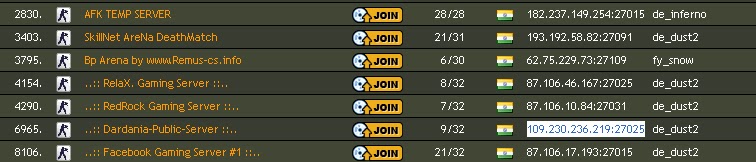
http://www.gametracker.com/search/cs/IN/


This is a Gaming  website which provide you with
IP and port of the server which you can connect
and play with other users connected to it.

Copy any IP according to your preference
you may choose any of IP and port available
pick IP of the server which is not full of players
Keep internet connection Running
Now Launch counter strike 1.6 Game

you have 2 options to Go on
1. Hit  ~   button your keyboard 
 a console will appear

write CONNECT and paste the ip and port you copied

eg. connect 109.230.236.219:27025

Now the game may download any additonal resources
if required and connect to server successfully .


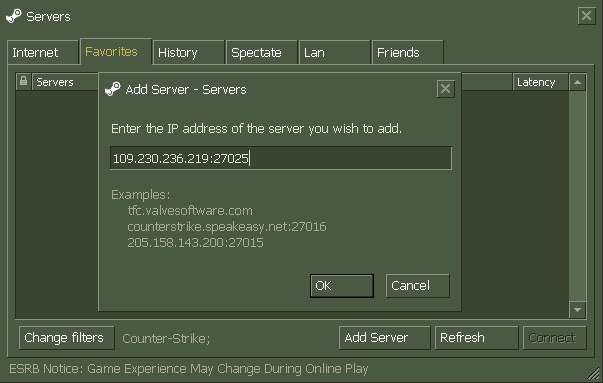
2.Other way to connect
This will allow to retain the server address which you are connecting
After you launch the game click on  Find servers
favorites -> add server-> ok


To connect just  double clicking the server address


Thanks for Reading!


POST WRITTEN BY SOHUM PRABHUDESSAI  CS GAMING  PRO

Visit his blog


Find More Tricks Click here

#Aircel Gprs trick 2012

Hi friends ..After along time comes a aircel Gprs Trick
This Trick is working fine in most of the states.
This Aircel Free Default Browser Trick Is Working  only on mobile.
As I always say

NOTE : keep your Balance below 1 rs before using this trick.

Just Follow The Settings Given Below:


Account Name:any
Apn: Aircelwap
Proxy: 192.168.35.201
Port: 8081
Homepage: 0.facebook.com.bypass-proxy.appspot.com/*url

  • *url can be any of your desired website

If It Works for you then fine ,otherwise dont waste your time Go ahead ,Leave A Comment.

Opera mini handlers for Andriod Symbian and others Mobile

 Here is a new collection specially for OPERA MINI Browsers
Downloading links are provided below each name
download and Enjoy internet.

  • OPERAMINI 3.12 
DOWNLOAD:
http://jumbofiles.com/6djy5pqcslpd/_Opmin_3.12_handler_ui131.zip_.html


  • OPERAMINI 4.4
DOWNLOAD: 
http://jumbofiles.com/hsw47fzc4yn8/_Opmin44a1hui202dzebb.jar_.html

  • OPERAMINI 4.2
DOWNLOAD: 
http://jumbofiles.com/fn4os28vadlx/_Opmod421b14hui203.jar_.html

  • OPERAMINI6.5 HANDLER
DOWNLOAD: 
http://jumbofiles.com/fv0i5908wvbi/_Opmin6527424hui202dzebb.jar_.html
  • OPERAMINI 5.1
http://jumbofiles.com/ovfo1g16wcir/_Opmin51hui202r1.jar_.html

  • OPERAMINI 5.1
DOWNLOAD: 
http://jumbofiles.com/7u46ylheos8t/_Opmin_5.1_Handler_Ui100_For_Android_Os2.1fix2.zip_.html

  • OPERAMINI 6.1 ANDROID HANDLER
DOWNLOAD: 
http://jumbofiles.com/5b4f101l3m9o/_Opera_Mini_6.1_Android_Handlerui100_Beta_Test.zip_.html

  • OPERAMINI 6.5
DOWNLOAD: 
http://jumbofiles.com/curbrqoj0tue/_Opmin65hui202dzebbfix1.jar_.html


Find More Tricks here

Have some Fun With Youtube videos

  •   View high quality videos :
 Youtube gives you the option to switch to high quality videos for some of the videos,
however you can check if a video is available in high quality format by appending

‘&fmt=18'(stereo, 480 x 270 resolution) or ‘&fmt=22'(stereo, 1280 x 720 resolution)

for even higher quality.


  •  Embed Higher Quality Videos :
 While the above trick works for playback, if however you want to embed hig quality videos you need to append

 “&ap=%2526fmt%3D18? and “&ap=%2526fmt%3D22?

 to the embed url.


  • Cut the chase and link to the interesting part :
Linking to a video where the real action starts at 3 minutes 22 seconds, wondered if you could make it
 start at 03:22? You are in luck. All you have to do is add

 #t=03m22s (#t=XXmYYs for XX mins and YY seconds)

to the end of the URL.


  • Hide the search box :
The search box appears when you hover over an embedded video. To hide the search box add

‘&showsearch=0'

to the embed url.


  •  Embed only a part of Video :
Just append
 ‘&start=30'
to skip first 30s of the video.
In general you can modify the value after start= to the number of seconds you want to skip the video for.


  •  Bypass Youtube Regional Filtering :
 Some videos are only available in certain parts of the world. Your IP Address is used to determine your
location and then allow or deny access to the video. Change the url from

http://www.youtube.com/watch?v=<somecode>

to

http://www.youtube.com/v/<somecode>


  •  Download Video :
 Although not inherently a youtube trick but useful all the same for downloading videos.
Just change youtube to kickyoutube in the url of the video and it will take you to kickyoutube.com
with all the options for downloading the video you were watching. Firefox Addons like
downloadvideohelper, grabitall, youtubevideodownloader etc.. also can be used to download the
video from the youtube.


  •  Autoplay a Video :
If you want your embedded video to start playing automatically,
once again you can do so by simply modifying the url. In this case you need to append the string

“&autoplay=1”

to the url and remove everything before and after the embed tag.


  • Loop a Video :
If you wish to loop a video add the string

“ &loop=1”

to the end of the url.


  •  Disable related videos in YouTube’s embedded Player :
 Many webmasters may want to disable related videos in YouTube’s embedded player since it encourages
the reader to navigate away from the current website. Once again the solution is as simple as appending
the string

“rel=0”

to the video URL.
Instead of manually modifying the embed code you can let a new service called VTubeTools do it.
VTubeTools.com allows you to customize your YouTube player with a few clicks. You can resize the player,
 autostart the video, loop the video and enable high quality version. It also allows you to set custom
background (you can just change the colours or even use your own background picture).


  •  Embed a Part of a YouTube Video :
Youtube supports a parameter called “start” that allows start playing an embedded video after a
specified number of seconds. For example if the interesting part of the video begins only after 20
 seconds you need to use the code &start=20.


  • Example Code:

  <object width=”425? height=”344?><param name=”movie” value=”http://www.youtube.com/v/KyuPDRflFDU&hl=en&fs=1&start=20“></param><param name=”allowFullScreen” value=”true”></param><embed src=”http://www.youtube.com/v/abcdefghijk...tart=20” type=”application/x-shockwave-flash” allowfullscreen=”true” width=”425? height=”344?></embed></object>


Find More Tricks  click here
DOCOMO 3G GPRS HACK 2012


Hello Friends, After long time i am posting a trick on DOCOMO
Everyone  are using 2G service and We all want to switch to the latest  speed 3G service which gives a  download speed of 500 kbps to 1000 kbps.Today I will show a trick using which you can use unlimited 3G service for free.

For the trick to work you need:
    Tata Docomo SIM Card with a balance of more than Rs. 1
    3G enabled cellphone
NOTE:keep Balance Low Before using trick


Follow the steps:

On mobile Go to Network connectivity settings and
Create New Access Point Using Below settings
and restart your phone.

              Name : any
              Access Point or APN : tata.docomo.dive.in
              Homepage : m.google.com or any
              Proxy : 220.226.181.88 or 202.87.41.147
              Proxy Port : 8080 or 80
              Username :  blank
              Password : blank

    Download Operamini 4.2 Handler Browser Form our Download section:

 CLICK HERE


   Now install the handler  and do the following changes in the Setiings:

  •  Set Divein Settings as Default Settings For Opera Mini
  •  Set http in Custom Field in your Opera Mini handler
  •  Set Socket Server to

 
http://220.226.181.88.server4.operamini.com
OR
 http://203.115.112.5.server4.operamini.com
OR
http://203.115.112.5.server4.operamini.com
OR
http://10.124.72.171.server4.operamini.com

  •  Keep Proxy Type as blank
Done with the settings
 
Your Browser will initialize when you save your settings .
Enjoy high-speed browsing

How to Like all Post on Facebook Page with a Single Click


This is not a trick but rather a extension for chrome.You can try this just for fun ,so only chrome users can try this .You might be a frequent Facebook User and reading updates by all your friends and liking them one at a time , sometimes It may take a long time to click on every like button .But we have a chrome extension that helps to like all things on your Facebook wall within a single click.

IN THE CHROME BROWSER VISIT:


http://www.chromeextensions.org/social-communications/facebook-like-all/


  • Go here and install this extension in your Chrome Browser.

  • After installing, you will see a button at top right corner of your browser as shown below in the image.


  • Now go to facebook page or wall on which you want to like all the updates. 

  • Hit the on chrome browser like button present at the top right corner .
  • You will see all the post are liked by you.
  • This will work on other website pages which has a like button.

You Can find more such extensions on Chrome Webstore.

https://chrome.google.com/webstore


Download Torrents Using IDM Downloader

Many people Dont Like to download Torrents using torrent client due to speed limitations and many reasons espicailly when you download file using mobile GPRS , Here in this post I will show you how you can download torrent files using IDM downloder.
Well The procedure is quiet complex and time consuming but works fine.
Follow the steps to download

  • 1) Download torrent file from torrent website and upload it in


      http://torcache.net/   and click on cache button

 
  •  It will give you another link  below image is an example of link after uploading torrent file in torcache


  •  Create an account in http://www.torrific.com/ and login with your account


  •  Just paste the new link which we got from torcache and click on get button


  • Cick on initiate bittorrent transmission button . you will also have option to download the file. Click on any link and now start using idm to download your torrents.

  Hope You Found This Useful

Want to Request Trick ? Post here..