Showing posts with label VPN. Show all posts

New Latest Working EppleVPN For Airtel 3G Gprs


Hi Guys After a long time I am posting a working VPN again 
Those who have problem in Installing a VPN can refer my previous post on VPN's 
which are explained in detail.

http://gprs9.blogspot.com/search/label/VPN
Here I am going to post just the VPN and the configurations.
This is a EppleVPN which works on proxy settings .
This works on Open VPN but not all

Download the OPENVPN specially designed for this VPN to work

http://www.mediafire.com/?l9nz7t8ghtx0u6e  

 Install the VPN overwrite if previous OPEN VPN is installed.

Now Browse To C:\Program Files\OpenVPN\config\

 And place the configuration files here .
TO GET CONFIG

##To Get configuration in your  your Email INBOX just leave your EMAIL ID in the comment below
Sorry i cant post this trick openly due to restriction by our Team members
Because Due  to open posting tricks get Blocked faster.
You will get Config files within 2hrs after you leave your Email Id.##

  
Run the VPN &connect your mobile with normal settings .
And then connect your VPN.


There are 3 configurations available choose the ones which 
gives you the most speed.


If you are facing problem in connection such as 
  • TCP Port read timeout expired
  • dev tun also require --ifconfig  

then just Edit the configuration and input new "http-proxy" in vpn config
Get fresh proxies with port 80 or 8080
Here are some:

199.168.148.136
89.248.96.54
115.112.232.251
115.112.232.246
200.57.88.167
195.112.133.138
190.102.128.217
190.102.128.203
195.16.49.214
216.49.191.142
184.82.236.76


If you have any question you can Leave a comment below!
Thanks For Reading ..
New A!rtel High speed GPRS Trick with VNAP NetBuster Proxy Pro using Backquery


Here is a working trick for airtel 2G and 3G
Just follow the simple steps to get free internet on airtel 2G and 3G
No account registration just use without any tension.
There is also another working trick:


CLICK HERE:

http://adf.ly/5E5fA

Download VNAP NETBUSTER PROXY PRO from here:

http://adf.ly/5ING5

To Begin with open the setup and install the Netbuster
on the desktop double click on icon as show below


the interface opens now
you may need .NET framework to run this software
download it here(win7 users no need to download)

http://filehippo.com/download_dotnet_framework_4/
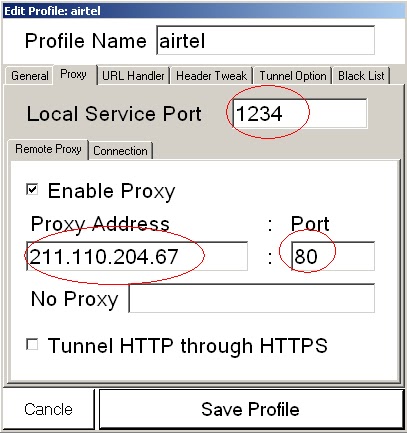
goto:PROFILE -> EDIT -> PROXY

Input port= 1234

Proxy(choose anyone):
113.10.164.138:80
64.152.0.46:80
112.25.12.37:80
112.25.12.38 :80
210.13.71.77
211.110.204.67
121.88.250.204

Do the settings as shown in image:


Now click on URL handler
input any working back query

like this ->    0:/?.twimg.com/a


and save the profile.

minimize the window.
Now goto your browser and goto proxy settings and input

port:1234

proxy: localhost or 127.0.0.1


save and then minimize the browser.

NOW CONNECT WITH APN= AIRTELGPRS.COM USING YOUR MOBILE

click on start in vpn netbuster and then goto any browser and hit any address and hit enter and
browse internet free.


Leave a comment if you face any problem.
 Find More Tricks here

PD PROXY WORKING AGAIN FOR #AIRTEL GPRS FEB 2012

Hi friends bad times have started again
UDP port 53 is now blocked since morning today.
Here is a working PD PROXY trick which is working
still . I had prevoiusley written a post on pD proxy
you have to just modify it a bit ,so lets begin

REFER MY PREVIOUS POST (FOR REGISTRATION & INSTALLATION PROCEDURE)


http://gprs9.blogspot.com/2012/01/airtel-pd-proxy-gprs-trick-vpn-trick.html


NOTE: use this trick at low balance .
Uninstall VPNs  TAP adapters if u have previoulsy installed.


ON THE OPEN INTERFACE OF PD PROXY
put ur username and password
choose demo server & ICMP

see screenshots


now click on configuration icon on top

then click on click here to show advanced settings
Install TAP drivers of PD proxy
After that
set TCP PORT= 53
      UDP PORT= 0

see screenshots


click on connect and you will connect to internet successfully

 Leave a comment if you face any problem
Find More Tricks here

New TSunami VPN for Airtel VPN blocked state and UP & others

Hi friends  here is a great News for all Vpn Blocked states.
Here is best working and most awaiting trick of the year
this VPN trick speacially for Uttar Pradesh , Tamil Nadu , West bengal  for other states  where VPN UDP port has been blocked.
I have been posting enough detailed procedure on how to install a vpn hope you guys know how to install any vpn. so I am directly posting brief procedure here. I will help you if u have any problem.
you can refer my previous post on vpn:


  • Install OpenVpn From Here:

http://swupdate.openvpn.org/community/releases/openvpn-2.2.1-install.exe

  • Register here for username and password Here and you will get password in Email(very important):

http://www.tsunamivpn.com/index.php/account/free-trial/register

  • after registering u will get user name and password and account activation link on ur email address.
Click on that link for account activation.

  • Run "Logan.exe" download it from  here:


http://www.mediafire.com/?jdkoslg02rj0v3v

PASSWORD :-  ravi_logan

  • Now ,Run openvpn and connect via " Tsunami_by_LOGAN5.ovpn " 

 Before this connect your mobile to PC using apn:airtelgprs.com
  •  Input username and password which you got by email

Wait Till the Vpn Gets conected .

Kiss Vpn for Airtel GPRS with 2 Rocking Servers.

Here Again Comes new vpn for airtel (Kiss VPN) with features such as fast downloading and surfing
Enjoy free gprs before it is blocked by airtel. The procedure is similar to all the other vpns posted before
you can refer my previous post of working VPN' explained with full procedure.


FOLLOW THE STEPS:

  • Download openvpn open source software from link given below:
        http://openvpn.net/index.php/open-source/downloads.html
  • Install the open vpn software it will be installed in C drive (may differ)
  • Next download the Kiss Vpn config from here:
        http://www.mediafire.com/?t5zrfadsa3wihhi
  • Next go to C:\Program Files\OpenVPN\config and paste the files there in the config folder Do not paste it in sample-config (may get confused).
NOTE: keep Balance less than 10paise

  • Connect your phone to pc with apn:airtelgprs.com
  • Double click on openvpn icon on desktop (see image)

  • click on connect and wait till the vpn is connected .Browse and download free.

Note:
This vpn will not work UDP port 53 is blocked in your state.

Drop a comment if you face problem.

Find More Tricks Click here

Working Shield VPN for A#rtel 3G Gprs 2012.

Hello friends I m back with a new vpn Trick (shield vpn)
Shield VPN free Gprs with airtel .This is one of best vpn software which
works without disconnection problem with free protection. This vpn has
ablilty to block the websites which has virus or some harmful scripts.
So Again  for newbies I am going to explain the installation  in detail .

  • To begin with download the file from link below

                  http://www.mediafire.com/?cboc8zbzba36wbt


            (you may need IZArc4.1.6.exe to open this file)

  • After you download then save the folder with all the other files where you can locate it easily

  • Click on the ShieldVPN.exe icon it will appear in the toolbar (see image)

  • Keep the username and password the same and Choose any server from the list of available Servers .Now double click on the icon and do following changes (see image)
              go to options and set port L to 53


  • Now click on DRIVERS and install them if you have not installed yet

  • Done with settings ,Now Return to the main interface

  • Connect your phone or plug usb  modem in usb slot and connect using normal mobile office settings
  • After connection has been established,
  • click on connect  button on vpn interface

  • The vpn will connect within 15-20seconds.
Downloading speed on 3G is 400kbps+ (subject to coverage area)
Leave a comment if you face any problem
Enjoy!(original post)


Find More Tricks Click here

Airtel PD PROXY Gprs Trick | Vpn Full Trick 2012


Airtel working PD PROXY VPN trick for PC.This Airtel Vpn Trick is 100% Working all over India And also tested by me .It Gives good speed Guaranteed.

Follow the steps:

  • First Download PD PROXY

http://www.filesonic.in/file/4262187415

or Downlaod from the website its the same.

http://www.pdproxy.com/download.html      (BEST OPTION)

  • Extract the file to the location where you can locate it easily

  • Now Go To
                   http://www.pdproxy.com/signup.htm

and Sign up for a new Account, confirm the account by visiting your
email inbox and Copy the username and password provided by them.

  • If you are using windows xp,vista  then you will have to download  Microsoft .Net framework

LINK:  http://filehippo.com/download_dotnet_framework_4/


windows7   users need not install this all .

  • After All Run Pd Proxy.exe on the extracted file 
  • Enter username and password. 
  • Select Server as: Demo sever and Port as:UDP


  • Goto settings and Goto Advanced settings Tab 
  • Set UDP Server as:53

  • Enable parent proxy


  • Click on connect
NOTE:Keep Balance Below 10 paise before using this trick.

(Befor clicking on connect ensure you have connected your phone to pc via usb or bluetooth)


Features:
Works without disconnection
Speed tested by me daytime 100kbps+(7mb modem)


I Hope You Enjoy This Airtel Working VPN Trick For Pc..

Incase you faceproblem then leave a comment.

New working VPN for airtel 3G GPRS 2012


Most of people find difficuilt to install or understand how to use vpn
so here in this post I am going to elobrate detailed procedure to
install a vpn and also give a working VPN
( Sathikvpn ) for airtel.

Starting with  the porcedure:


FIrst download the file from the link given below:

LINK:

http://www.mediafire.com/?erc39uk7ptxj8my


Incase you are finding problem to download the file
Leave your Email and I will send them to your inbox.

EXtract the file and open the folder ,you will find 3 files
see the screenshots:
Now Connect your phone with normal GPRS settings
Let it connect ,now leave it aside.


NOTE: Keep Balance Below 10 paise before using any of our trick.

click on  Sathikvpn.exe


and a red icon will appear in your taskbar


Befor connecting vpn check in your Network settings if you
enabled The TAP adapter


Now left click it and connect


It will initialize and connect sucessfully.


If you get error such as this


"Wed Jan 11 17:58:10 2012 write UDPv4: No Route to Host (WSAEHOSTUNREACH) (code=10065)"


It means that your normal airtel connection is disconected.

NOTE:

  • If UDP ports are blocked in your state then this trick will not work.
  • In windows 7 run the file as administarator
  • DOWNLOAD SPEED:400kbps+

Leave a comment if You face any problem.

#FR3E GPRS USING RAPTOR VPN ON AIRTEL

Friends Here is is Raptor vpn which is one and only vpn service provider that gives unlimited bandwidth and lifetime free service with max. speed.
Steps---> 1.First Register at Raptorvpn.com and verify ur email.Than download my attachment from hotfile.

2.Connect with airtelgprs.com FOR AIRTEL via pc suite.

3.Now open Raptor vpn(My Attachment) and it would minimize to system tray.

4.Then right click at Raptor Globe one or two and then click on connect.

5.Than it would ask for your id and pass.Just fill them and wait for 1 minute and it would connect.
Than everything is free in ur pc.

Note: I am using it at 0 bal and getting 250+ speed on 7mbps modem.

download VPN SEETINGS FORM HERE

"http://www.plunder.com/Raptor-VPN-portable-by-sking3042-download-c100d6894c.htm"
or
"http://www.mediafire.com/?k820dokuni7eg5d"

AFTER INSTALLING


AFTER CONNECTING THE STATUS WILL BE


ENJOY!

NEW DUCK VPN FREE GPRS ON PC

NEW DUCK VPN GIVES A
BANDWIDTH OF I GB/DAY AND YOU
CAN CREATE MORE ACCOUNT FOR
MORE INFO
HERE IS THE LINK CLICK HERE
GO AND REGISTER(ABOVE LINK)
AND
DOWNLOAD THE VPN FROM HERE
[Download here ]

AIRTEL FREE INTERNET ON PC USING VPN


HEY guys now this is must have
vpn for 2G and 3G users.
You can use free internet on pc.

1st go here and register an
account


https://libertyhero.com/getlibertyhero/


then download this and run as administrator
and put your password in pass.txt
file or no password
CLICK HERE TO DOWNLOAD

Want to Request Trick ? Post here..